
Announcement
August 27, 2026 · 7 min read
Google Moved Events Into Search Results. Here Is What Changed.
Google retired its standalone events pages in August 2026. Event listings now exist only as a feature inside regular search results. What that means for anyone working with Google events data, and the full changelog for our Real-Time Events Data API.

Adam Ben-Ayoun
CTO, OpenWeb Ninja
Google Events · SERP · API Changelog
What Google changed
For years, Google Events was its own destination. Searching for "events in Austin" showed a small events box on the results page, and clicking it opened a dedicated, scrollable events view: a long list you could page through, filters for today, tomorrow, this weekend, next week and next month, an online-events toggle, and a detail panel for each event with tickets, venue and description. That view had its own URLs and its own data endpoints behind it.
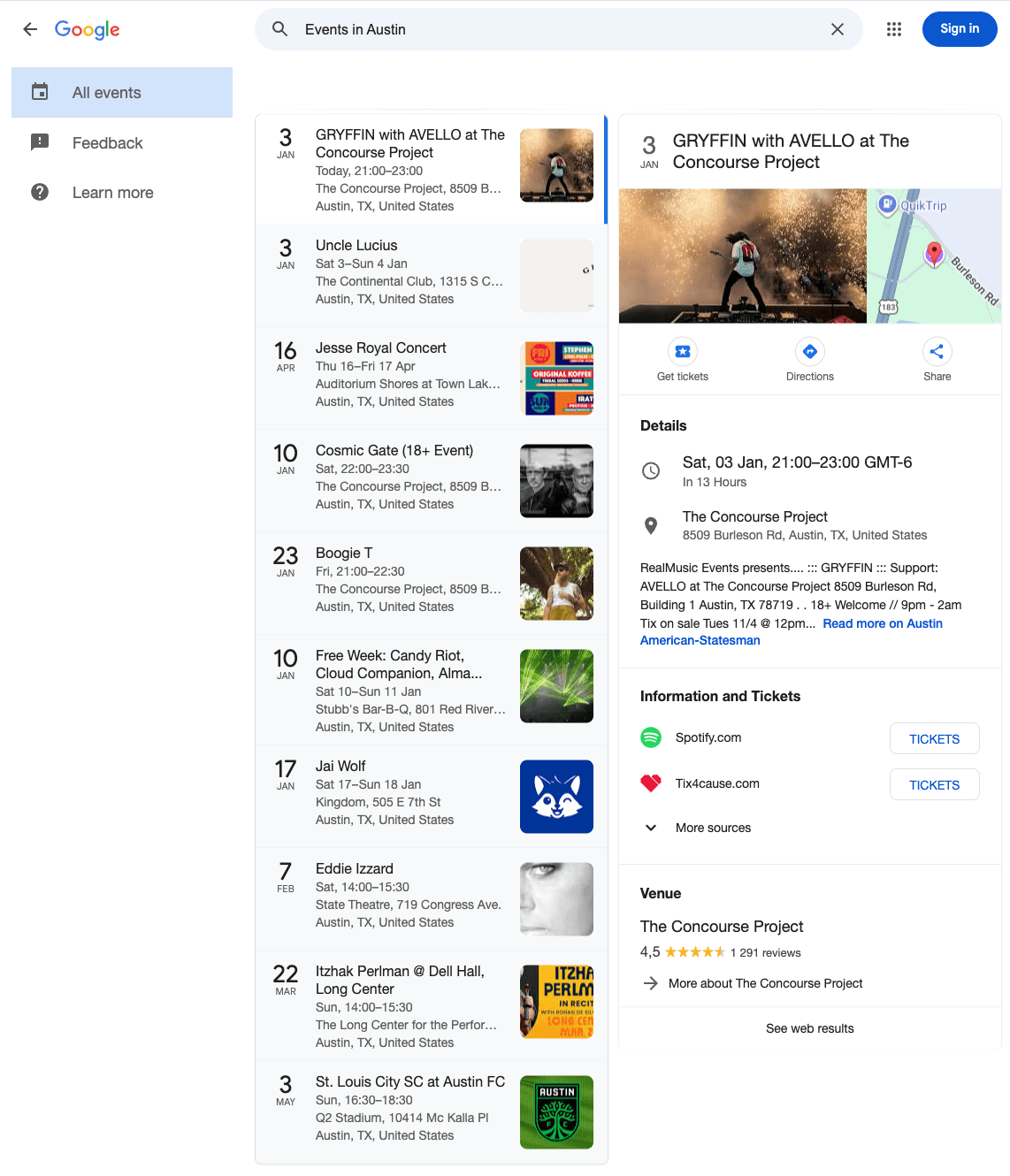
In August 2026 Google retired that view. The URLs and endpoints that powered it stopped returning data. Events did not disappear from Google, but they moved: they now live only as an Events feature embedded in the regular search results page, next to organic results, People Also Ask and AI Overviews.
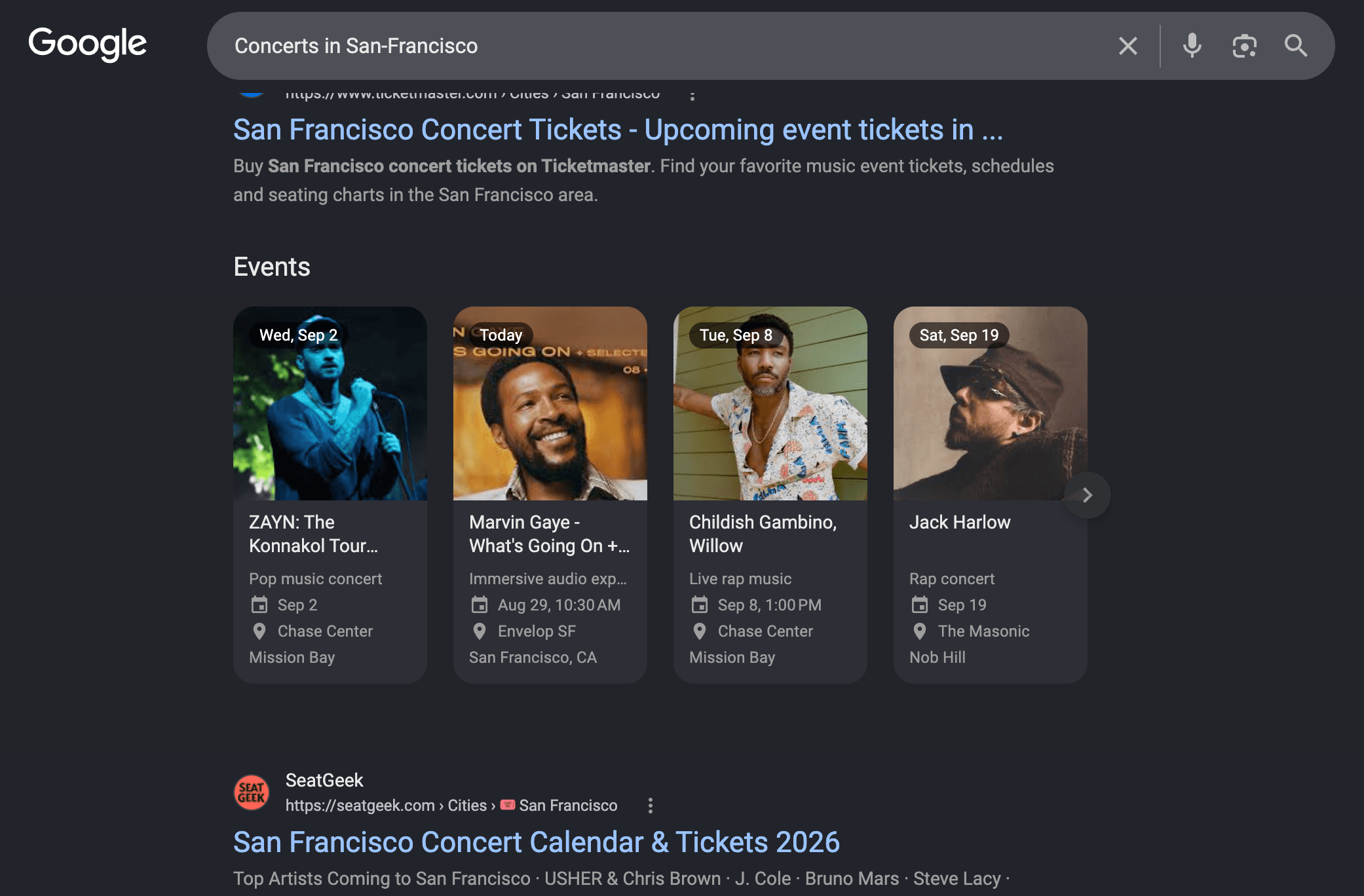
The new feature is a horizontal carousel of event cards, shown in the screenshot at the top of this post. Each card shows the event title, a date label ("Today", "Tomorrow", "Sat, Aug 29"), a start time, a category label such as "Live music event", the venue and a short address. Clicking a card opens a side panel with the full details: description, the source site with a link to tickets, price when the source publishes one, the venue's Google profile with rating, hours, phone and website, and shortcuts to add the event to Google Calendar or get directions.
How the new Events feature behaves
We spent the past days mapping the new feature so we could rebuild on it. It is smaller than the view it replaces in some ways and richer in others, and these constraints apply to anyone reading events from Google, not just to our API:
- A fixed set of 10 events per query. The carousel holds 10 cards and there is no paging beyond them.
- It only appears for event-style queries. Google shows the feature when the search reads like an events search, such as "events in austin" or "concerts in new york this weekend". A plain query doesn't return events at all.
- Coverage differs by country. We see the feature consistently for US and UK searches. Some countries do not render it at all yet.
- New permanent event id:
entity_id. The old view gave every event a stable id. In the new feature each card carries an opaque token that Google uses to open the detail panel, and ourevent_idis now built on it, so it still works with/event-detailsas before. The permanent identifier is nowentity_id, Google's own id for the event, which is the same however the event was found (see the new fields below). - Venue data is richer. The detail panel pulls the venue straight from Google Maps: rating, review count, opening status, photo and a one-line description.
What this means for the Real-Time Events Data API
Our Real-Time Events Data API read the old events view, so when Google retired it, /search-events and /event-details stopped returning data. We rebuilt both endpoints on the new Events feature: one request to get the 10 cards Google shows for the query, then one request per card to open its detail panel, plus a Google Maps lookup for the venue. They are live again at the same URLs.
We kept the interface as close to the previous version as we could. Endpoints, request parameters and every existing response field keep their names and meaning. Fields Google no longer provides are returned as null rather than removed. New data the feature exposes is added under new field names. For most integrations this is a no-op. The sections below list exactly what to expect.
Changelog: endpoints and parameters
| Endpoint | Status |
|---|---|
GET /search-events | Same URL, now reads the new Events feature |
GET /event-details | Same URL, now reads the new Events feature |
/search-events parameters
| Parameter | Behaviour now |
|---|---|
query | Required, as before. Phrase it like an events search ("events in austin", "concerts in new york this weekend"). |
date | Same values: any, today, tomorrow, week, weekend, next_week, month, next_month. Google no longer has a date filter, so the matching words are appended to the query ("... this weekend"). A hint, not a hard filter. |
is_virtual | Same values. There is no online filter on Google anymore, so "online" is prepended to the query. A hint, not a hard filter. |
region | Same values. us and uk are confirmed to return events. Some regions return none. |
language | As before. |
start | Deprecated. Still accepted so existing calls do not break, but it has no effect: Google shows a fixed set of 10 events with no further pages. It will be removed in a future version. |
/event-details parameters
| Parameter | Behaviour now |
|---|---|
event_id | Required. Must come from a /search-events response. It is now a longer opaque string and temporary: once Google stops honouring one, /event-details returns 404 and you should search again. |
region, language | As before. |
Changelog: response fields
Unchanged
Every field from the previous version is still returned with the same name and meaning:
venue.google_id, venue.name, venue.phone_number, venue.website, venue.review_count, venue.rating, venue.subtype, venue.subtypes, venue.full_address, venue.latitude, venue.longitude, venue.district, venue.street_number, venue.street, venue.city, venue.zipcode, venue.state, venue.country, venue.timezone, venue.google_mid
ticket_linksnow has one entry, since Google shows a single source per event.info_linksholds the secondary link when Google has one.is_virtualandlanguageare unchanged.
Kept, but always null
Google no longer provides a precision indicator for event times, so start_time_precision_sec and end_time_precision_sec are always null. They stay in the response so existing parsers do not break.
New event fields
Example values are from a live /search-events?query=events in austin texas call.
| Field | Example | Meaning |
|---|---|---|
entity_id | /g/11zh7b9k7k | Google's entity id for the event. Identical whatever query surfaced it, so it can be used as a deduplication key, etc |
position | 1 | Rank in Google's list, 1 to 10 |
category | Hip-hop album party | Google's one-line category label |
date | Today | The date label Google shows: Today, Tomorrow, Fri, Sep 11 |
price | $19 | Ticket price as shown by Google, e.g. $19 or $37. null when the source publishes no price |
is_free | false | false for a priced event, null when no price is published, true when Google labels the event as free |
map_image | https://www.google.com/maps/vt/data=... | Static map tile of the venue |
calendar_link | https://calendar.google.com/calendar/render?action=TEMPLATE&dates=20260829T180000/20260829T210000&ctz=America/Chicago... | Add to Google Calendar link with start, end and timezone |
directions_link | https://maps.google.com/maps?...&daddr=1502+E+6th+St,+Austin,+TX+78702 | Google Maps directions to the venue |
New venue fields
| Field | Example | Meaning |
|---|---|---|
venue.cid | 17866060601177878364 | Google Maps CID of the venue |
venue.map_link | https://maps.google.com/?cid=17866060601177878364 | Google Maps page of the venue |
venue.hours | Open · Closes 10 PM | Current opening status as shown by Google. null when not available |
venue.photo | https://lh3.googleusercontent.com/... | Venue photo |
venue.summary | Popular East Side music venue with a huge patio, full bar, food truck & 2 stages. | Google's short venue description |
venue.price_range | $10–30 | The venue's price range (not the event's) |
Example response
One event from /search-events?query=events in austin texas, trimmed. Long URLs are shortened.
{
"event_id": "eyJmYyI6IkVvd0lDc3dIUVVwcFZEUjBT...",
"name": "Let’s Fund Good: Kendrick Lamar Album Party",
"link": "https://theaustincommon.com/event/lets-fund-good-kendrick-lamar-album-party/",
"description": "Austin, don’t kill our vibe! Join us at Hotel Vegas on August 28th for a Kendrick Lamar album party...",
"language": "en",
"date_human_readable": "Sat, Aug 29, 2026, 6:00 PM",
"start_time": "2026-08-29 18:00:00",
"start_time_utc": "2026-08-29 23:00:00",
"start_time_precision_sec": null,
"end_time": "2026-08-29 21:00:00",
"end_time_utc": "2026-08-30 02:00:00",
"end_time_precision_sec": null,
"is_virtual": false,
"thumbnail": "https://encrypted-tbn3.gstatic.com/images?q=tbn:ANd9GcTapNhdUxPmD...",
"publisher": "Theaustincommon.com",
"publisher_favicon": "https://encrypted-tbn2.gstatic.com/faviconV2?url=https://theaustincommon.com...",
"publisher_domain": "theaustincommon.com",
"ticket_links": [
{
"source": "Theaustincommon.com",
"link": "https://theaustincommon.com/event/lets-fund-good-kendrick-lamar-album-party/",
"fav_icon": "https://encrypted-tbn2.gstatic.com/faviconV2?url=https://theaustincommon.com..."
}
],
"info_links": [],
"venue": {
"google_id": "0x8644b5b0ee3b94f3:0xf7f0ff7554cf2f5c",
"name": "HOTEL VEGAS",
"phone_number": null,
"website": "http://www.texashotelvegas.com",
"review_count": 1267,
"rating": 4.5,
"subtype": "Bar",
"subtypes": ["Bar", "Live music venue"],
"full_address": "HOTEL VEGAS, 1502 E 6th St, Austin, TX 78702",
"latitude": 30.263418299999998,
"longitude": -97.72722879999999,
"district": "East Austin",
"street_number": "1502",
"street": "1502 E 6th St",
"city": "Austin",
"zipcode": "78702",
"state": "Texas",
"country": "US",
"timezone": "America/Chicago",
"google_mid": "/m/0k2_qjq",
"cid": "17866060601177878364",
"map_link": "https://maps.google.com/?cid=17866060601177878364",
"hours": null,
"photo": "https://lh3.googleusercontent.com/grass-cs/ACvplmMuCqPz1brSpxNhLPJ...",
"summary": "Popular East Side music venue with a huge patio, full bar, food truck & 2 stages.",
"price_range": "$10–30"
},
"entity_id": "/g/11zh7b9k7k",
"position": 1,
"category": "Hip-hop album party",
"date": "Today",
"price": null,
"is_free": null,
"map_image": "https://www.google.com/maps/vt/data=zMG8Aj-iLk-Z29k0MAIEeQ...",
"calendar_link": "https://calendar.google.com/calendar/render?action=TEMPLATE&text=Let%E2%80%99s+Fund+Good...&ctz=America/Chicago",
"directions_link": "https://maps.google.com/maps?...&daddr=1502+E+6th+St,+Austin,+TX+78702"
}
Also available in the Real-Time Web Search API
Because the carousel is now part of the regular results page, the Real-Time Web Search API returns it too. When Google renders the Events feature for a query, the /search endpoint response includes an events_results array with the same card data (up to 10 cards, first page only). The array is omitted when the page has no Events section. Use this when you want events alongside the rest of the SERP, and the Real-Time Events Data API when you need the full per-event details.
From a live /search?query=concerts in san francisco call:
"events_results": [
{
"position": 1,
"entity_id": "/g/11zcv9wtw3",
"title": "ZAYN: The Konnakol Tour Concert",
"date": "Wed, Sep 2",
"start_time": "Sep 2",
"venue": "Chase Center",
"category": "Pop music concert",
"address": "San Francisco, CA"
},
{
"position": 2,
"entity_id": "/g/11nr4y00cd",
"title": "Childish Gambino, Willow",
"date": "Tue, Sep 8",
"start_time": "Sep 8, 1:00 PM",
"venue": "Chase Center",
"category": "Live rap music",
"address": "San Francisco, CA"
},
... 8 more cards
]
Practical notes
- Getting more than 10 events. Vary the query instead of paging: by neighbourhood or nearby city, by category ("jazz concerts", "comedy shows", "kids events") and by date words ("this weekend", "in september") and merge the results. Deduplicate on
entity_id. - An empty list means Google showed no Events carousel for that query. The API only returns what Google renders, so if the search results page for your exact wording has no Events section, you get an empty list. Rephrasing the query as an events search, for example "events in austin" or "concerts in san francisco this weekend", can make the carousel appear.
- Use
entity_idas the permanent event id. It is Google's own identifier for the event and stays the same however the event was found, so it is the key to use for deduplication, indexing and change detection.event_idis an opaque token Google can invalidate and is only meant for calling/event-details. Since the search response already includes the full details for every event, most integrations never need that call.
No change to plans or pricing. If something you depended on is missing or behaves differently, write to support@openwebninja.com and we will look into it.

Written by
Adam Ben-Ayoun
CTO at OpenWeb Ninja
Adam leads engineering at OpenWeb Ninja, building the APIs and infrastructure that make public web data accessible to developers and AI agents.
Connect on LinkedInGet Google events data in one call
The Real-Time Events Data API returns the events Google shows for any query, with venue details, times in local and UTC, prices and ticket links. Free tier included, no credit card required.
Real-Time Events Data API