
Reference
Updated May 2026 · 10 min read
Google Search Parameters: Complete Developer Reference
Google Search supports 15+ URL parameters that control what results come back: country context, interface language, time filters, city-level location, search vertical, and result personalization. This page covers each parameter with valid values, defaults, and practical usage for rank trackers, SERP pipelines, and data extraction tools.

Adam Ben-Ayoun
CTO, OpenWeb Ninja
Google Search · URL Parameters · Reference
Key Takeaways
- -Google removed the num parameter in September 2025. Passing num=100 returns 10 results - the same as not passing it.
- -udm=14 strips AI Overviews from results and returns classic organic rankings. udm=50 activates Google AI Mode.
- -gl and hl are independent: gl sets country context for results; hl sets the Google interface language.
- -uule has two versions: w+ encodes a named city (protocol buffer); a+ encodes lat/lon coordinates (1e7 integer format + radius).
- -tbs covers time presets (qdr:d, qdr:w, qdr:m) and custom date ranges (cdr:1,cd_min:MM/DD/YYYY,cd_max:MM/DD/YYYY).
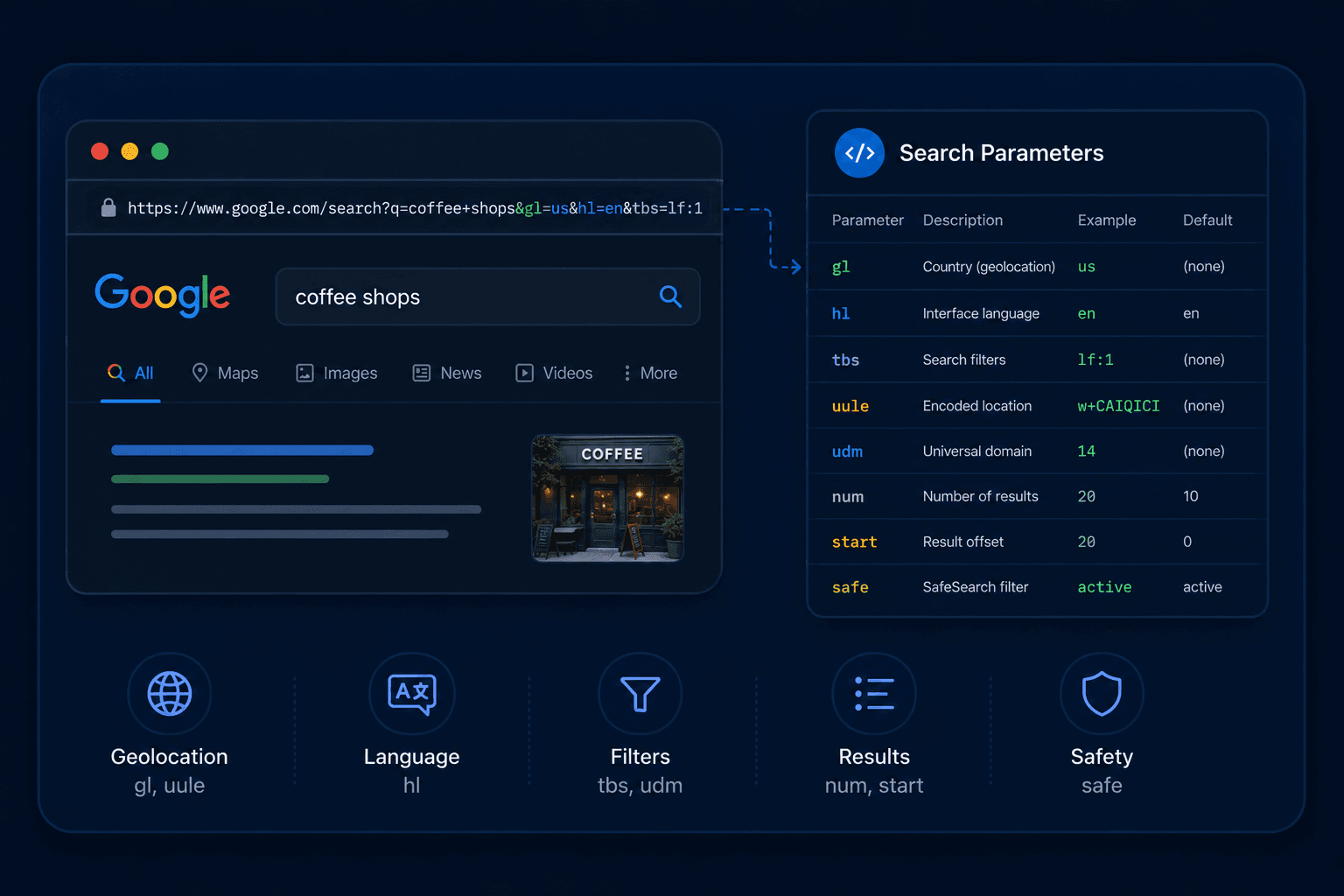
Quick Reference
All parameters at a glance. Detailed explanations follow below.
| Parameter | Purpose | Default | Status |
|---|---|---|---|
| q | Search query. Supports all Google search operators. | Required | Active |
| gl | Country context for results (ISO 3166-1 alpha-2: us, gb, de). | us | Active |
| hl | Interface language (BCP 47: en, fr, de, en-gb). | Browser | Active |
| tbs | Time filter, date range, sort by date, verbatim mode. | None | Active |
| tbm | Search vertical: isch, nws, vid, bks, shop. | Web | Active |
| udm | Display mode. udm=14 removes AI Overviews. udm=50 = AI Mode. | None | Active |
| uule | Encoded location override. v1 (w+): named city. v2 (a+): lat/lon coordinates. | None | Active |
| safe | SafeSearch: active or off. | off | Active |
| filter | Duplicate clustering: 1 = cluster (default), 0 = show all. | 1 | Active |
| nfpr | Disable autocorrect: 1 = exact query, 0 = autocorrect allowed. | 0 | Active |
| start | Pagination offset: 0, 10, 20... | 0 | Active |
| num | Results per page (formerly 1-100). | 10 | ⚠️ Dead (Sep 2025) |
| lr | Language restrict: lang_en, lang_de. Pipe-separated for multiple. | None | Active |
| cr | Country restrict: countryUS, countryGB. Pipe-separated for multiple. | None | Active |
| kgmid | Knowledge Graph entity ID. Overrides q for entity panels. | None | Active |
gl and hl: Country and Language
These two are the most searched parameters and the most commonly confused. They control different things.
gl - Country
Sets which country's Google you're querying. Affects result localization, what sites rank, and which local knowledge panels appear. Uses ISO 3166-1 alpha-2 codes.
Examples
gl=us - United States
gl=gb - United Kingdom
gl=de - Germany
gl=fr - France
gl=in - India
gl=jp - Japan
gl=br - Brazil
gl=au - Australia
hl - Interface Language
Sets the language of the Google interface - labels, autocomplete suggestions, and some result formatting. Uses BCP 47 language tags. Does not filter results to that language (use lr for that).
Examples
hl=en - English
hl=en-gb - English (UK)
hl=de - German
hl=fr - French
hl=es - Spanish
hl=ja - Japanese
hl=pt-br - Portuguese (Brazil)
hl=zh-cn - Chinese (Simplified)
Key distinction: gl=de&hl=en returns results relevant to Germany, with the Google interface in English. This is the correct setup for tracking German market rankings from an English-language tool. Setting only gl=de without hl may return German-language interface elements.
uule: Location Override
gl targets a country. uule overrides your exact location — city or coordinates. Google uses it to return Local Pack and location-sensitive results as if the request came from that place. The main use case: testing local rankings without routing through a proxy in each target city.
There are two versions, identified by their prefix.
Version 1 — Named location w+
Encodes a canonical place name (City, Region, Country) as a protocol buffer, then base64-encodes the result. The place name must match the Google Ads geo targets database.
# New York, New York, United States
uule=w+CAIQICIYTmV3IFlvcmssIE5ldyBZb3JrLCBVU0E=
# London, England, United Kingdom
uule=w+CAIQICIgTG9uZG9uLEVuZ2xhbmQsVW5pdGVkIEtpbmdkb20=
Version 2 — Latitude/longitude a+
Text-based (not binary). Encodes a structured record with lat/lng in 1e7 integer format (divide by 10,000,000 to get decimal degrees), a radius in meters, and a microsecond timestamp. Base64-encode the text and prepend a+.
# Plaintext before base64 encoding
role:1
producer:12
provenance:6
timestamp:1715000000000000 # microseconds since epoch
latlng{
latitude_e7:407127796 # 40.7127796° N
longitude_e7:-740059731 # -74.0059731° W (New York)
}
radius:620 # 1 meter × 620; use -1 for exact point
# Then: base64(plaintext) → prepend "a+"
uule=a+cm9sZToxCnByb2R1Y2VyOjEy...
tbs: Time Filtering and Advanced Modes
tbs (to be searched) is the most versatile filtering parameter. It handles date range filtering, sort order, and verbatim mode. Multiple values can be combined with a comma.
Date Presets
| tbs value | Filters to |
|---|---|
| qdr:h | Last hour |
| qdr:d | Last 24 hours |
| qdr:w | Last week |
| qdr:m | Last month |
| qdr:y | Last year |
Custom Date Range
For an exact date window, use cdr:1 combined with cd_min and cd_max. Date format is MM/DD/YYYY.
# Results from Q1 2026 only
tbs=cdr:1,cd_min:01/01/2026,cd_max:03/31/2026
Sort and Mode Modifiers
| tbs value | Behavior |
|---|---|
| sbd:1 | Sort by date (newest first). Overrides relevance ranking. |
| li:1 | Verbatim mode. Disables synonym expansion and spelling correction. Google returns only exact-match results. |
Tip: When using date filters, add filter=0 to prevent Google from clustering similar results. Without it, you may get fewer results than expected because Google collapses near-duplicates.
tbm and udm: Search Vertical
Two parameters control which search vertical Google displays. tbm is the older one;udm is newer, reverse-engineered from Google's interface, and adds modes that tbm doesn't cover.
tbm values
| Value | Vertical |
|---|---|
| isch | Images |
| nws | News |
| vid | Videos |
| bks | Books |
| shop | Shopping |
udm values
| Value | Vertical |
|---|---|
| 2 | Images |
| 7 | Videos |
| 12 | News |
| 14 | Web only (no AI Overviews) |
| 18 | Forums |
| 28 | Shopping |
| 36 | Books |
| 39 | Short videos |
| 50 | Google AI Mode |
udm=14 for clean SERP data: Since Google expanded AI Overviews globally, passing udm=14 strips AI-generated summaries from results and returns classic organic rankings. Useful for rank trackers and SERP pipelines that measure traditional position data. The AI Overviews API handles the opposite case - when you specifically want structured AI Overview content.
safe, filter, nfpr: Result Controls
safe
SafeSearch filtering. active filters explicit content; off disables filtering.
safe=off | safe=active
filter
Controls whether Google clusters near-duplicate pages. Default is 1 (clustered). Set to 0 to see all results independently - useful when combined with tbs date filters to avoid losing results to clustering.
filter=0 | filter=1
nfpr
Disables Google's autocorrect. By default, Google silently corrects misspellings and expands abbreviations. Set nfpr=1 when searching for product model numbers, part codes, or any term Google would incorrectly "fix"
nfpr=1 (disable autocorrect)
start: Pagination
start sets the offset for which result to begin from. Google returns 10 results per request. To paginate:
# Page 1: results 1-10
start=0
# Page 2: results 11-20
start=10
# Page 3: results 21-30
start=20
Quality drops sharply after ~100 results (start=90). Google typically only indexes the first 10 pages of results for most queries.
num was removed in September 2025
Google silently disabled the num parameter between September 12-14, 2025. Passing num=100 returns exactly 10 results - the same as not passing it. No error is returned. Most documentation written before October 2025 still lists num as a working parameter. It is not. Use start for pagination instead.
lr and cr: Language and Country Restrict
Unlike gl and hl which set the context of your search,lr and cr filter the results themselves.
lr - Language Restrict
Limits results to pages written in specified languages. Format: lang_XX. Pipe-separate for multiple.
lr=lang_en - English only
lr=lang_de - German only
lr=lang_fr - French only
lr=lang_en|lang_fr - English or French
cr - Country Restrict
Limits results to pages hosted in specified countries. Format: countryXX (ISO 3166-1 uppercase). Pipe-separate for multiple.
cr=countryUS - US-hosted pages
cr=countryGB - UK-hosted pages
cr=countryDE - German-hosted pages
cr=countryUS|countryCA - US or Canada
kgmid: Knowledge Graph Entity Panels
kgmid targets a specific entity in Google's Knowledge Graph directly. It accepts a Google machine ID (MID) - an internal identifier Google uses for real-world entities. When present, it overrides the q parameter and returns the Knowledge Panel for that entity.
# Knowledge Panel for McDonald's
kgmid=/m/07gyp7
# Knowledge Panel for Python (programming language)
kgmid=/m/05z1_
MIDs can be found by inspecting Knowledge Panel URLs on Google Search or via the Google Knowledge Graph Search API. Useful for competitive research on how Google represents a brand entity.
Using These Parameters with a SERP API
The Real-Time Web Search API supports gl, hl, tbs, uule, safe, filter, nfpr, and device natively. Pass them as query parameters on the same request.
Example: UK market, past week, no clustering
# serp_params_example.py
import requests
url = "https://api.openwebninja.com/realtime-web-search/search"
headers = {"x-api-key": "YOUR_API_KEY"}
params = {
"q": "python web scraping libraries",
"gl": "gb", # UK market
"hl": "en", # English interface
"tbs": "qdr:w", # Past week only
"nfpr": "1", # No autocorrect
"safe": "off", # No SafeSearch
"filter": "0", # Show all results, no clustering
}
resp = requests.get(url, headers=headers, params=params)
data = resp.json()
# Organic results are at data["data"]["organic_results"]
for result in data["data"]["organic_results"]:
print(result["position"], result["title"])
Response structure
{
"status": "OK",
"request_id": "81faa261-eb24-40b1-b8e8-9f5d397525e9",
"parameters": {
"q": "apple inc",
"gl": "us",
"hl": "en",
"start": 0,
"fetch_ai_overviews": false
},
"data": {
"organic_results": [
{
"position": 1,
"rank": 1,
"title": "Apple",
"url": "https://www.apple.com/",
"displayed_link": "www.apple.com",
"domain": "www.apple.com",
"snippet": "Discover the innovative world of Apple and shop everything iPhone, iPad..."
}
],
"has_ai_overviews": false,
"related_searches": [
{ "query": "Apple Inc stock", "link": "https://www.google.com/search?q=..." }
],
"knowledge_graph": {
"title": "Apple",
"description": "Apple Inc. is an American multinational technology company...",
"attributes": { "founded": "April 1, 1976", ... }
}
}
}
Paginating through results
# Fetch 3 pages (30 results total)
for page in range(3):
params["start"] = str(page * 10)
resp = requests.get(url, headers=headers, params=params)
results = resp.json()["data"]["organic_results"]
print(f"Page {page + 1}: {len(results)} results")
FAQ
Most common questions and answers
What does the gl parameter do in Google Search?
What is the difference between gl and hl?
How do I filter Google search results by date?
What is the uule parameter?
Is the num parameter still working?
What is udm=14?

Written by
Adam Ben-Ayoun
CTO at OpenWeb Ninja
Adam leads engineering at OpenWeb Ninja, building the APIs and infrastructure that make public web data accessible to developers and AI agents.
Connect on LinkedInTest these parameters against real Google results
The Real-Time Web Search API supports gl, hl, tbs, uule, safe, filter, nfpr, and device. Free plan includes 100 requests/month - no credit card required.